Webex Admin
Authentication
Webex authentication lets your integration securely access Webex APIs on behalf of a user without collecting or storing their Webex password.
anchorWhy authentication is required
anchorWebex APIs protect user and organization data. Before an integration can read that data or perform an action, Webex must confirm who is granting access and what the integration is allowed to do.
The OAuth 2.0 authorization code flow provides that consent and establishes a secure way for your integration to make API requests:
- Your integration sends the user to Webex to sign in.
- Webex shows the user the permissions, or scopes, that your integration is requesting.
- The user approves or denies access.
- If access is approved, Webex sends your application a short-lived authorization code.
- Your server exchanges the code for an access token and refresh token.
- Your integration uses the access token when calling Webex APIs and the refresh token when continued access is needed.
The access token represents the user and the permissions they approved. It does not give the integration unrestricted access: the token is limited by its scopes and by the permissions of the user who authorized it.
For quick API exploration, you can use your own personal access token. Register an OAuth integration when an application needs to access Webex for other users or maintain access beyond a personal token's lifetime.
anchorBefore you implement OAuth
anchorTo implement the OAuth flow described below, you need:
- A registered Webex integration and its client ID and client secret.
- A redirect URI that exactly matches one of the URIs registered for the integration.
- The minimum integration scopes required by your application.
- A server that can receive the OAuth callback and protect the client secret and tokens.
For Webex Contact Center administrator APIs, the user authorizing the integration must use a Webex account backed by Cisco Webex Common Identity and have the appropriate administrator role in Control Hub. See Webex Contact Center administrator roles and privileges.
anchorRequesting Permission
anchorSend the user to the Webex authorization endpoint:
https://webexapis.com/v1/authorize
Include these URL-encoded query parameters:
| Query parameter | Value |
|---|---|
response_type | Set to code. |
client_id | The client ID issued when you created the integration. |
redirect_uri | One of the redirect URIs registered for the integration. |
scope | A space-separated list of scopes registered for the integration. |
state | A unique value your application can validate when Webex calls the redirect URI. |
After the user signs in, Webex displays a grant dialog showing the access requested by the integration.
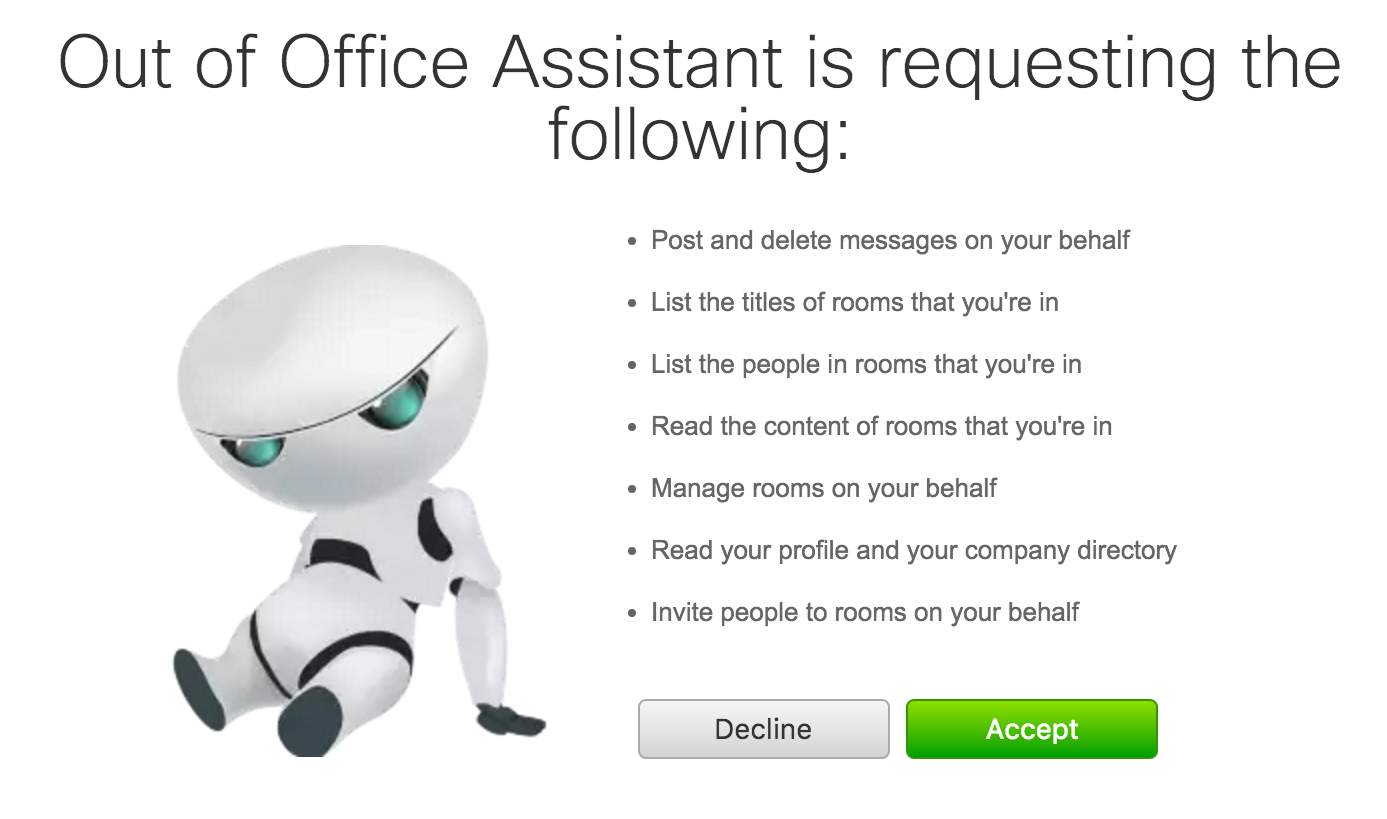
Scopes
Scopes limit the resources and operations available to an access token. Request only the scopes your application needs and ensure that the authorizing user has the corresponding permissions. See Integration Scopes for the complete list and important scope behavior.
State
Use the state parameter to correlate the callback with the authorization request and protect against request tampering. Generate an unpredictable value for each authorization attempt, associate it with the user's session, and validate the returned value before exchanging the authorization code.
anchorHandling the callback
anchorAfter the user approves access, Webex redirects the browser to the registered redirect_uri. The callback includes the one-time authorization code and the state value, for example:
https://your-server.example.com/auth?code=AUTHORIZATION_CODE&state=STATE_VALUE
Verify state before using code. The authorization code is short-lived and can be exchanged only once.
anchorGetting an Access Token
anchorExchange the authorization code by sending an application/x-www-form-urlencoded POST request to:
https://webexapis.com/v1/access_token
Include these parameters:
| Parameter | Value |
|---|---|
grant_type | Set to authorization_code. |
client_id | The integration's client ID. |
client_secret | The integration's client secret. |
code | The authorization code returned to the redirect URI. |
redirect_uri | The same redirect URI used in the authorization request. |
curl --request POST 'https://webexapis.com/v1/access_token' \
  --header 'Content-Type: application/x-www-form-urlencoded' \
  --data-urlencode 'grant_type=authorization_code' \
  --data-urlencode 'client_id=YOUR_CLIENT_ID' \
  --data-urlencode 'client_secret=YOUR_CLIENT_SECRET' \
  --data-urlencode 'redirect_uri=https://your-server.example.com/auth' \
  --data-urlencode 'code=AUTHORIZATION_CODE'
The response contains an access token, a refresh token, and their expiration values. Store the tokens securely and use the expiration values returned by the service rather than assuming a fixed lifetime.
Using the Refresh Token
Before continued access is needed, exchange the refresh token for a new access token by sending another form-encoded POST request to https://webexapis.com/v1/access_token.
| Parameter | Value |
|---|---|
grant_type | Set to refresh_token. |
client_id | The integration's client ID. |
client_secret | The integration's client secret. |
refresh_token | The refresh token returned by the previous token response. |
curl --request POST 'https://webexapis.com/v1/access_token' \
  --header 'Content-Type: application/x-www-form-urlencoded' \
  --data-urlencode 'grant_type=refresh_token' \
  --data-urlencode 'client_id=YOUR_CLIENT_ID' \
  --data-urlencode 'client_secret=YOUR_CLIENT_SECRET' \
  --data-urlencode 'refresh_token=YOUR_REFRESH_TOKEN'
Store the new access token and any replacement refresh token returned by the service.
anchorInvoking the Webex APIs
anchorSend the access token in the Authorization header using the Bearer scheme:
curl 'https://webexapis.com/v1/people/me' \
  --header 'Authorization: Bearer YOUR_ACCESS_TOKEN' \
  --header 'Accept: application/json'
For Authorization Code Flow with Proof Key for Code Exchange (PKCE), Device Authorization Grant, and OpenID Connect behavior, see Login with Webex.
anchorNext steps
anchor- To test Webex APIs with your own account, get a Personal Access Token.
- To access Webex on behalf of other users, create an Integration and review the available Integration Scopes.